


It's Time to Break Up with Archive Tables
 Something I've been thinking about lately is how much work I force onto SQL Server simply because data gets old. An order processing system may need to keep data for three years for warranty reasons or seven years for compliance reasons, but that doesn't mean that data has to live all those years in your hottest, most active table and database. It also doesn't mean you should spend a lot of effort moving it, row by row, to an archive table, never mind a completely different database. Only to delete it later. If you're constantly fighting archiving processes that interfere with everyday workload, this conversation might be for you.
I've blogged about the dreaded archive table before (Exhibit A, Exhibit B, Exhibit C). My biggest complaint is that a single row gets written multiple times:
- I write the row to the production table
- when it's cold, I delete it and write it to the archive table
- when it ages out, I delete it from the archive table
That's four writes for one row, not counting any updates that happen over its lifetime. Multiply that by the number of indexes it touches, and then again by the number of replicas, and add in the impact to transaction log backups and statistics drift, and the costs of moving that row around (even long after it has stopped changing) can add up quickly. Another problem is that we spend a surprising amount of effort making sure every row is archived exactly once – we don't necessarily want the archive to have all the same indexes and constraints as production, since most of those usually aren't needed. But we still do things like:
insert archive
select ... from source
where not exists
(
  select 1 from archive where key = source.key
);
Or worse:
where not exists
(
 select col1, col2, col3 from source
 intersect
 select col1, col2, col3 from archive
);
I saw this exact pattern as recently as last week, so don't try to tell me people don't do it.
A storage unit analogy
Several years ago, we moved to North Carolina. One of the downsides of our new house (and most houses down here), compared to the northeast, is no basement. Combined with very little attic space, this means the garage becomes the default overflow for everything that doesn't fit inside the house.
Fast forward a few years. The kids grow, we cycle through furniture, I buy more tools, and we suddenly have a lot more bikes, pumps, sporting goods, beach gear, Christmas decorations, and so on.
The garage fills up, and there are things we longer use, but that I'm not yet ready to throw away. For more space, our options are to move, get a shed, build an addition, or rent a self-storage unit. We rent a storage unit a few blocks away, which I will refer to as "the archive." We move some of these older and less-frequently-used items to our archive storage unit. Being a data person, I have a spreadsheet with details about each box or item, which I will call "the indexes." Every time I move a box, I need to update my indexes spreadsheet that I moved them, so I don't tear the garage apart looking for it later.
As our garage continues to get more stuff, so does the storage unit. Eventually, the storage unit fills up too, and we need to make space (or spend money: rent a second unit or move everything to a bigger unit). There are things in there that we definitely won't use anymore, so we delete rows from the archive take some boxes from the storage unit and either donate them or haul them to the dump. And update my indexes spreadsheet so, again, I don't tear apart the garage or the storage unit looking for them.
What if, instead of carrying each box to the storage unit as soon as I decided it was "old," I filled an entire pallet in the garage and only moved it once it was full? The work of loading the pallet is the same, but the trip to storage becomes one quick move instead of hundreds of little ones.
Back to the data
The self-storage analogy made me realize I don't have an "old data" problem, I have a "moving the same data over and over again" problem. And the data can be in more than the two states we usually talk about (active vs. archived):
- Hot – Actively being used
- Warm – Not active, but still needed locally (e.g. for historical reports)
- Cold – Not needed for reports, but still needed for legal or compliance reasons
- Expired – Can be removed from the archive
Notice none of those four words imply where the data should physically live at each of those stages! The problem, I think, is that we've somehow conflated a row's state with where it has to live. A row can be hot, warm, cold, or ready for deletion without ever leaving the same table. That doesn't mean I think we should keep seven years of data in a heap and hope for the best. But those are business concepts, not storage requirements, and we think of archiving mostly as solving a performance problem ("the table is getting too big").
What this isn't
None of this is meant as an argument against archiving; a lot of data eventually has to leave production, one way or another. We have retention and compliance requirements, but data inevitably gets old… just maybe not as fast as the ever-growing table it's in, which becomes harder to maintain over time.
We tend to think there are only two choices for a row's lifecycle:
- leave the row where it is, forever or until it can be deleted
- copy it somewhere else
But we don't often consider the lifecycle of the data independent of its physical location. Because we have at least a third option: change which "slice" of the table a row belongs to, then move or delete that entire slice as a unit. But it means we have to…
Stop thinking in rows or small batches
Your archiving processes walk a tightrope – you want to move a bunch of rows that meet some criteria to the archiving table, but you want to minimize the impact on the system and the workload. So you fiddle with how many rows you delete per batch, how long you wait between batches, how many batches you process per job run, and when and how often the job runs. You add indexes on both sides to make the process (and NOT EXISTS predicates) more efficient; these indexes, in turn, impact all of your index maintenance activities (even those you shouldn't be doing, which I'll be writing about soon, too).
I've worked with customers who delete 100 rows per batch during business hours and 5,000 rows per batch on weekends, to minimize impact. But if you have to archive a million rows every day, the total impact and duration will be quite similar, outside of locking fewer rows at any given time during peak activity. Rows which, by definition, should no longer be causing any kind of contention with the active workload anyway. Ironically, the oldest and least interesting data ends up consuming a disproportionate amount of maintenance effort.
It strikes me as a bad trade-off, and dealing with the effects of row-by-row archiving has made me explore alternatives.
Enter partitioning
At a high level, I don't want to make individual queries faster, or partition every table, or stop running archive jobs. I just want to reduce movement that feels unnecessary. If you visualize what we do today, this is kind of a "death by a thousand cuts" scenario:
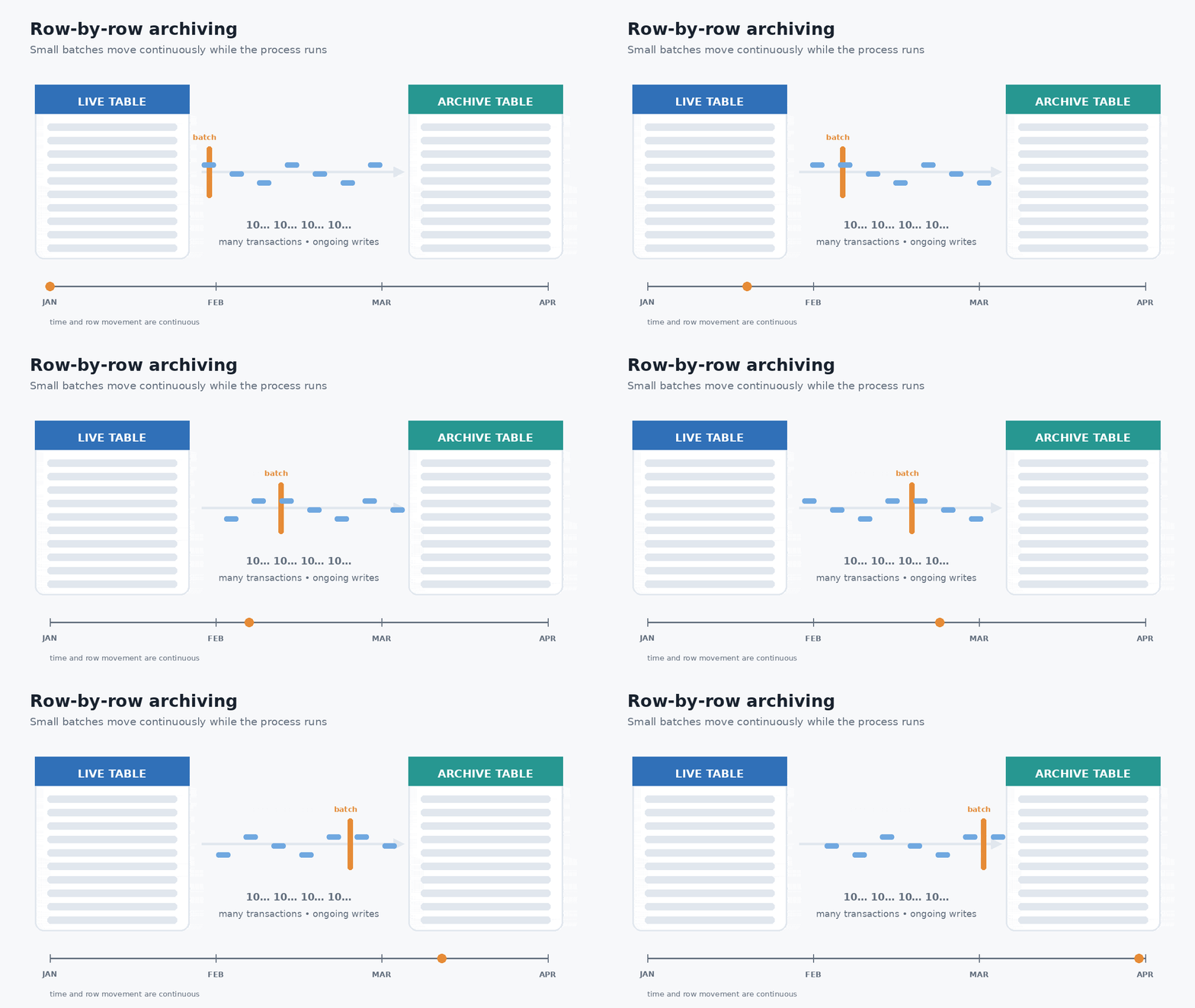
(Yes, I used ChatGPT to make these GIFs, because you don't want to see my version in crayon.)
What we can do with partition switching is not be moving handfuls of 90-day-old rows every few minutes all month long, but simply "detaching" the 4-month-ago partition in one single metadata operation. Instead of copying rows or pages of data, SQL Server simply changes which object owns those pages. The rows don't move at all:
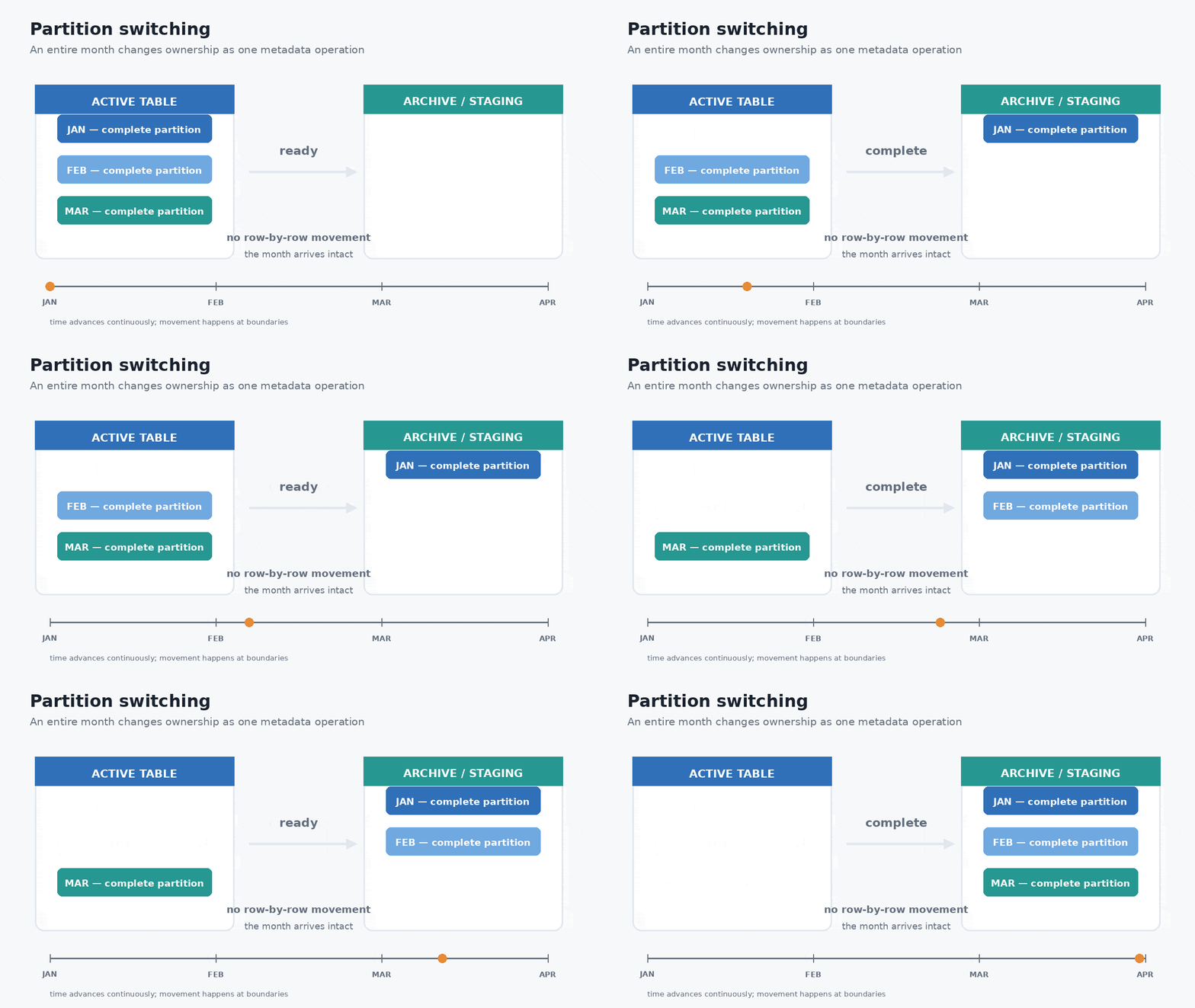
This pattern is called a "sliding window," because the active portion of the table keeps moving forward while older partitions slide out. Think of the table as a conveyor belt instead of a bucket. New partitions arrive at one end, old partitions leave at the other, and the window of "active" data is simply what's on the conveyor belt right now.
Now, the animations are crude and gloss over a few implementation details on purpose. If the archive table is actually in a different database, that's okay. The initial switch can still be instantaneous and leave the oldest partition as its own table in the main database. You can then move it to the archive database separately and on a different schedule (e.g. with BCP out or even its own batch-row-copy process). You're still moving the same amount of data eventually; the upside is that the movement is no longer coupled to the table your application is actively using.
As for deleting old data once it ages out of archive, well, nothing stops us from partitioning the tables in the archive database, too. So instead of nibbling away at the oldest data in the archive tables all day long, we just switch out or truncate the oldest partition and move on.
The goal isn't to eliminate archiving or even row-by-row/batch processing, it's just to stop making your busiest table participate in every step of it. Whether those switched-out partitions stay in the same database for another month, move immediately to an archive database, or are eventually deleted is almost beside the point. The optimization comes from changing how the data leaves the active table, not from where it ends up afterward or how long it takes to get there.
This isn't a simple, universal answer
I don't want to sound like I'm glossing over some important details and suggesting that you can "just turn on partitioning!" Partitioning has costs of its own, but they're usually paid once during design, instead of continuously throughout the life of every row. And when you are trying to implement partitioning for a large, busy table, there's no magic wand. Just ask these folks:
- Cathrine Wilhelmsen
- Ben Snaidero
- Rolf Tesmer
- Diego Cardoso
There are also other complexities that will require attention. Mostly, it is important to note that partitioning isn't a performance feature! Additionally:
- Monthly partitions work great when your retention policy and partitioning key are based on an immutable date, but they become harder when the business defines "old" using some other criteria. One example is an order's ship date that isn't initially populated when the row is created.
- Your choice of partitioning key deserves serious thought; changing it later usually means rebuilding the entire table.
- For switching to remain metadata-only, indexes generally need to be aligned with the partition scheme.
- Foreign keys are probably the biggest design consideration, because you can't switch partitions while those relationships are in the way unless you've planned for them up front.
- Existing queries won't automatically benefit from partition elimination. If they don't filter on the partitioning key, SQL Server may still have to look at every partition.
- Enterprise Edition makes sliding windows much easier because index maintenance can stay online; on Standard Edition you'll likely need maintenance windows or accept some additional operational complexity.
If you've looked at partitioning before and walked away, especially before it was even possible in Standard Edition, I don't blame you. If it isn't practical for your environment, there are still alternatives. Partitioned views, for example, let you split data across multiple tables while still exposing a single logical table to the application. They're more work to maintain, and they don't give you the elegance of metadata-only partition switching, but they avoid some of the restrictions that come with native partitioning. If those restrictions are what kept you from adopting partitioning in the first place, they're worth a look. (I've also written before about another "poor man's partitioning" approach using filtered indexes.)
Native partitioning is my favorite implementation because it makes moving those segments almost free. The important part is changing the mindset. Whether you end up with partitioned tables, partitioned views, or even manually segmented tables, the important step is to stop treating every old row as an independent archiving project.
What I'm really advocating
I'm not writing this to tell you that archive tables are evil or that every large table should be partitioned. Plenty of systems are perfectly happy with the approach they've had for years, and archiving can continue to be an effective solution even if it isn't the most efficient.
What I do hope is for us to question the assumption that older data has to move, row-by-row, just because it's old. If your biggest table keeps getting bigger, and your archive process keeps taking longer, maybe it's time to stop thinking about moving rows and start thinking about moving boundaries.

This is a fantastic article.
I've found it sometimes tricky to adopt partitioned tables when you're starting out with humungous unpartitioned tables.
https://michaeljswart.com/2026/07/partitioning-a-huge-table/
Hi Aaron,
I really enjoyed your article “It’s Time to Break Up with Archive Tables” and found it incredibly insightful. However, regarding this approach, I’ve hit a specific architectural roadblock and would love your insight.
I have a partitioned table with monthly boundaries predefined 10 years into the future on a Current filegroup. I want to moving older monthly partitions (e.g., data from 6 months ago) to an Archive filegroup using a sliding window technique.
The typical metadata-only approach (SWITCH OUT to a staging table on Current, MERGE the boundary, SPLIT it again, and SWITCH IN from a staging table rebuilt on Archive) fails here. Because the boundary is intermediate (future partitions already exist), the SPLIT operation ignores the NEXT USED filegroup declaration and simply inherits the filegroup of the existing adjacent partition.
Since recreating the entire partition scheme or rebuilding the whole clustered index defeats the purpose of metadata-only operations, what is your best practice for sliding an intermediate partition to a different filegroup when future boundaries are already mapped out? Is there a metadata trick to bypass this limitation, or is a physical data movement inevitable in this specific scenario?
Thanks
Mohammad, are you trying to move data to a different filegroup but keep the partition in the same table? If so, I'm curious what you're gaining by using the archive filegroup. Is the Archive filegroup on slower storage? Typically we slide windows out so that the old data ends up in a separate table or database and can then be dropped easily when we stop needing to keep it. I'm probably missing something but I'm trying to understand the goal of switching filegroups while keeping all the data in a single table.
In any case, if you need to move data to a different filegroup, then no, you can't do that as a metadata operation; the data has to be physically moved. If you can give a better description of your goals and an example of before and after such a switch, I may be able to provide better answers.
Indeed! For us, we kind of have to work backwards. Sooner than later, we need to inject partitioning into existing customers who have outgrown their current archiving process. But looking forward, we want to make that an internal/implementation choice for new customers – basically a checkbox for the provisioners – which may ultimately hinge on their expected volume, retention requirements, and SQL Server edition.
Great article.
For this to work I assume each partition requires its own data file.
Which , in Azure SQL, isn't possible
Thanks! No, each partition does not require its own data file, or even its own filegroup. Multiple partitions can live quite happily on the same filegroup and, as you suggest, that's required in Azure SQL Database, where all partitions reside on PRIMARY.
Separate filegroups can be useful for things like piecemeal restore, tiered storage, or certain I/O scenarios, but they aren't required for partitioning. The primary benefit I'm after here is manageability: being able to SWITCH an entire slice of old data in a metadata operation instead of copying and deleting millions of individual rows. That benefit still applies when every partition is on the same filegroup.
Also, the types of archiving problems I'm describing tend to become more critical as databases get very large. At the scale where you're managing multiple TBs of active and historical data, Azure SQL Database may or may not be the platform you'd have chosen in the first place. But if you are using it, the lack of multiple filegroups doesn't prevent you from taking advantage of partitioning in general or this specific sliding window pattern.