


Why do you have so many housekeeping jobs?
When I inspect a new SQL Server instance for the first time, I am often surprised by the number of maintenance and housekeeping jobs. There can be a lot going on, and it's not uncommon to find several of these jobs scheduled to start at the same time, usually at exactly midnight. This can create compounded resource usage and practically invites the processes to interfere with each other.
For many of these routine tasks, I would much rather have a single job that runs them sequentially. This avoids concurrency issues and gives us a much cleaner view of the job list, current activity, and execution history. And no, I don't mean putting every maintenance operation into one ginormous job, but there are definitely some consolidation opportunities worth pursuing, particularly for things that run once a day or less.
Here are some of the tasks I typically see fleet-wide, along with whether I consider them housekeeping:
| Task | Typical cadence | Housekeeping? | Notes |
|---|---|---|---|
| Cycle SQL Server error log | Weekly | ✅ | Keeps individual logs manageable; retain enough archives for your desired history. |
| Cycle SQL Agent error log | Weekly | ✅ | Easy one to forget. sp_cycle_agent_errorlog. |
| Purge SQL Agent job history | Daily/weekly | ✅ | sp_purge_jobhistory; don't let msdb.dbo.sysjobhistory grow forever. |
| Purge backup/restore history | Daily/weekly/monthly | ✅ | sp_delete_backuphistory; this is separate from deleting backup files. |
| Purge Database Mail history | Weekly/monthly | ✅ | Old sysmail_* rows and event log entries can accumulate substantially. |
| Purge Policy-Based Management history | Weekly/monthly | ✅ | msdb.dbo.syspolicy_*; another commonly forgotten source of msdb growth. |
| Clean maintenance-framework history | Daily/weekly | ✅ | Ola's CommandLog, custom logging tables, monitoring snapshots, etc. |
| Delete/age out backup files | Daily | ✅ | Usually filesystem/cloud retention rather than SQL Server itself. |
| Database backups | Full/diff/log schedule | — | Obvious, but belongs in any complete maintenance inventory. |
| Test restoring backups | Weekly | — | Always have a restore plan, not a backup plan. A backup is worthless unless you prove it can be restored. |
DBCC CHECKDB |
Daily/weekly | — | Ideally run against every database often enough that backup retention still gives you recovery options. This dated article on minimizing DBCC impact still has some relevant advice. |
| Update statistics | Daily/weekly/as needed | — | Prefer targeted/intelligent updates rather than blindly updating everything. |
| Index maintenance | Selectively | — | Rebuild/reorganize only where evidence justifies it; certainly not "rebuild everything every Sunday." I am working on a post about making this smarter and based on page density rather than fragmentation %. |
| Query Store maintenance/checks | Daily/weekly | ✅ | Verify capture isn't read-only unexpectedly, storage isn't full, stale-query cleanup policy is appropriate, log actionable regressions for review. |
| Plan-cache purge | Not scheduled | — | I'd explicitly call this an anti-maintenance task unless there is a demonstrated, specific reason. I am also working on a post about measuring whether this busy work is worth it. |
| Sync logins between AG replicas | Daily/on change | ✅ | Includes SID, password hash, default DB, server roles, permissions, etc. Usually unnecessary for logins created in the contained AG; instance-level logins still require separate management. |
| Sync Agent jobs between AG replicas | Daily/on change | ✅ | Plus operators, alerts, credentials/proxies where relevant. Also usually unnecessary for jobs created in the contained AG; instance-level Agent jobs still require separate management. |
| Sync other instance-level objects | Daily/on change | ✅ | Linked servers, credentials, proxies, Database Mail config, server-level permissions, endpoints, certificates where applicable. |
| Check backup health | Daily | ✅ | Not just “did a job succeed?” Verify every DB has appropriately recent full/log backups. |
Check DBCC CHECKDB currency/results |
Daily | ✅ | Same distinction: verify coverage, not merely that a job exists. |
| Check AG health | Frequent/daily summary | — | Synchronization state, queues, suspension, unhealthy replicas, excessive lag. |
| Check database state | Daily | ✅ | ONLINE, not SUSPECT, RECOVERY_PENDING, unexpected READ_ONLY, etc. |
| Check disk/file capacity | Daily | ✅ | Free space, unexpected file growth, autogrowth configuration, max sizes. |
| Check transaction log health | Daily | ✅ | Space usage, VLF count, log_reuse_wait_desc, abnormal growth. |
| Check tempdb configuration/usage | Daily | ✅ | File equality, growth settings, file and drive headroom, and unexpected persistent consumers. I actually do this way more than daily and have a comprehensive post about this coming soon. |
| Check for pending identity/sequence exhaustion | Weekly | ✅ | Particularly worthwhile for old int identity columns creeping toward the ceiling. |
| Check for pending certificate expiration | Weekly/monthly | ✅ | Especially TDE, endpoint, backup, Service Broker, or custom certs. |
| Check failed/long-running Agent jobs | Daily | ✅ | A successful maintenance job isn't useful if another important job has silently been failing for three weeks. |
| Clean old Agent output files / dump files | Daily/weekly | ✅ | Job-step output, dumps, trace files, diagnostic artifacts, etc. |
| Clean old Extended Events files | Daily/weekly | ✅ | If sessions use rollover files but don't enforce sufficient retention themselves. Need to include stopped sessions; example PowerShell command below. |
| Clean old audit files | Policy-driven | ✅ | SQL Audit can quietly eat substantial disk space. |
| Check for configuration drift | Daily | ✅ | Notice drift relatively quickly – server-level options like MAXDOP and CTFP, as well as database-level options like RCSI and optimized locking. |
I'm not going to provide explicit code examples for all of these; many will depend on how you're doing things (e.g. Ola for certain types of maintenance). You may already be performing many of these checks using external tools rather than relying on SQL Server Agent. But I did want to show a cleaned-up job list, how it can help, and dive into a few specific steps.
Before & after
It hurts to see a job list like this:
|
|
When I consolidate all of those housekeeping jobs into a single job, most of my dealings with SQL Server Agent are far less stressful, though there is still some work to do here:
|
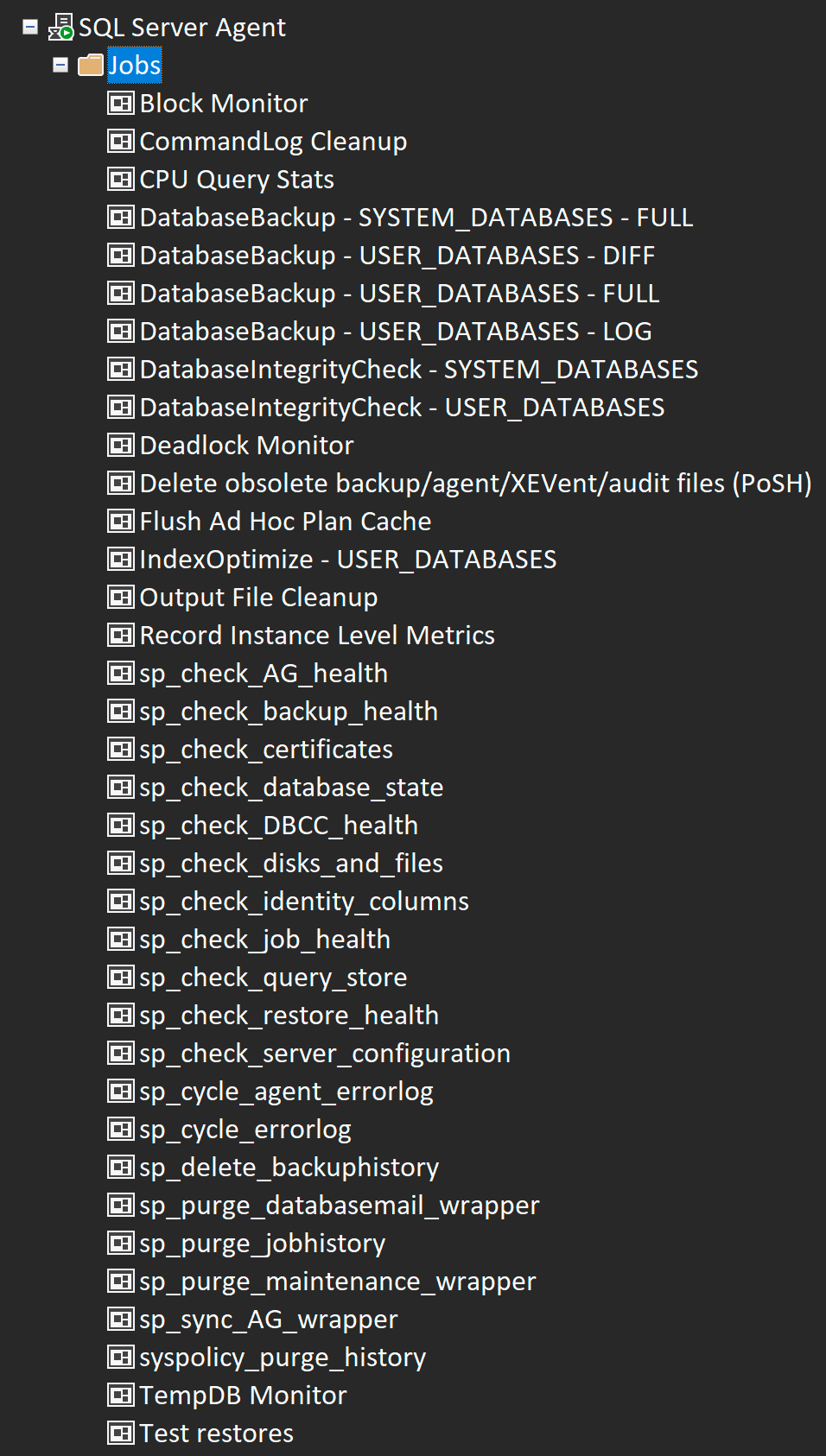
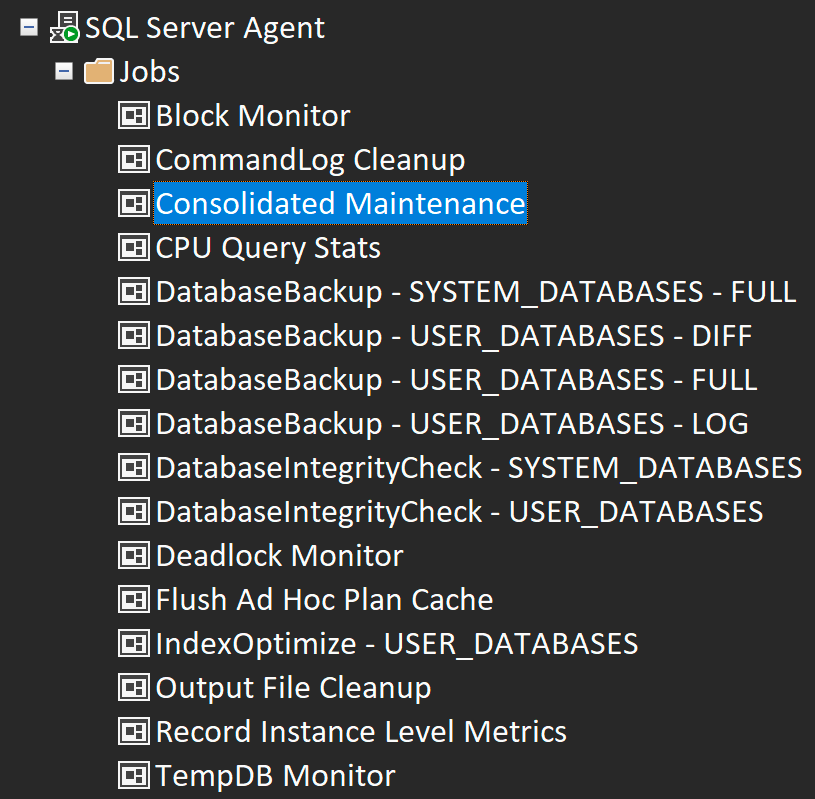
In the consolidated job, I can group all the steps by the day of the week they're supposed to do something and the order I want them to execute when they do run. I prefix each step with the desired day of week (or (d) for every day):
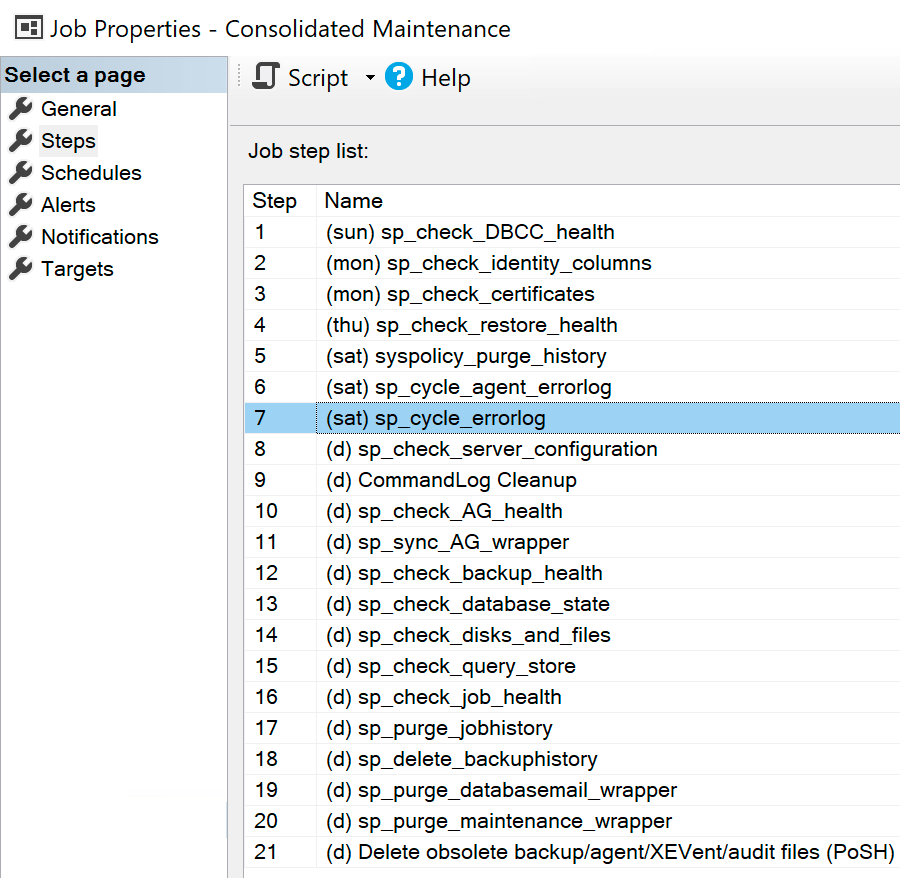
There isn't a whole lot of strategy in that list currently, other than running the things that only run once a week before the things that run every day; not running actionable checks toward the end of the week (I'd rather have some kind of summary on Monday morning); and pushing the operating system stuff last.
Inside each step is simple IF logic to determine whether a step runs today.
Run on a specific day
One caution I'll have here is that you should avoid unreliable ways to calculate the day of the week right now. I've seen lots of code over the years that asks questions like:
IF DATENAME(WEEKDAY, getdate()) = 'Tuesday'
/* or */
IF DATEPART(WEEKDAY, getdate()) = 2
These are unreliable. The first is influenced by @@LANGUAGE and the second is influenced by @@DATEFIRST. Oh, these pesky regional settings messing with our code! To calculate whether today is Tuesday, it is much safer to use a formula based on a delta from a known Tuesday. I like to use January 1 (since it's very easy to construct with DATEFROMPARTS given a year), though you could use any pattern you like. Here are recent January 1sts for each weekday:
| Day of week | Watermark date |
|---|---|
| Sunday | 2023-01-01 |
| Monday | 2024-01-01 |
| Tuesday | 2019-01-01 |
| Wednesday | 2020-01-01 |
| Thursday | 2026-01-01 |
| Friday | 2021-01-01 |
| Saturday | 2022-01-01 |
To determine if today is Tuesday, I just need to check if the number of days since my known watermark Tuesday is evenly divisible by 7:
DECLARE @KnownTuesday date = '20190101'; /* or from a table */

IF DATEDIFF(DAY, @KnownTuesday, getdate()) % 7 = 0
BEGIN
  /* It's Tuesday! */
END
A deterministic function could be written this way, avoiding any dependencies on (or assumptions about) regional, language, datefirst, or case sensitivity settings:
CREATE OR ALTER FUNCTION dbo.IsItThisWeekday
(
    @Today   date,
    @Weekday varchar(9)
)
RETURNS bit
WITH SCHEMABINDING, RETURNS NULL ON NULL INPUT
AS
BEGIN
  RETURN (CASE WHEN DATEDIFF(DAY,
        CONVERT(date, CASE @Weekday COLLATE Latin1_General_100_CI_AS
            WHEN 'Sunday'    THEN '20230101'
            WHEN 'Monday'    THEN '20240101'
            WHEN 'Tuesday'   THEN '20190101'
            WHEN 'Wednesday' THEN '20200101'
            WHEN 'Thursday'  THEN '20260101'
            WHEN 'Friday'    THEN '20210101'
            WHEN 'Saturday'  THEN '20220101'
        END, 112), @Today) % 7 = 0 THEN 1
        ELSE 0 END
  );
END
Then the code just has to say:
DECLARE @TargetDay varchar(9) = 'Tuesday', /* don't use DATENAME() here either! */
        @Today     date       = sysdatetime(); /* don't use UTC! */

IF dbo.IsItThisWeekday(@Today, @TargetDay) = 1
BEGIN
  /* It's Tuesday! */
END
Yes, you could do this as an inline table-valued function, which may help with other weekday-related queries, but there is little benefit for this specific use case. And you could enhance the code by making misspellings like 'Funday' more obvious, but I'll leave that as an exercise for the reader.
(And the warning about UTC is just that SQL Server Agent runs according to the local time of the server. And while I believe all servers should be in UTC, I know you don't all agree with me.)
Cycling the errorlog
This is the item that triggered this entire conversation: on some servers, we had months of data inside a single errorlog file, so opening, scrolling, and searching can be slow and tedious. I would much rather have a single errorlog file per week, and keep 32 of them – 26 to keep roughly 6 months plus some padding to account for patching or other out-of-band restarts. Some people like to see a single, complete errorlog since the last startup, so they know exactly where to find things like instant file initialization and lock pages in memory. But if you cycle the error log every Saturday at around the same time, the one representing an actual service restart becomes painfully obvious in the list: it's the one that doesn't happen on Saturday at midnight. This is a good cutoff too because if something happened last week or over the weekend, you know exactly which errorlog it's in.
To set errorlog retention to 32 (actually 33 including the current errorlog), you can use PowerShell, which writes to the registry:
Set-SqlErrorLog `
    -ServerInstance "MyServer\MyInstance" `
    -MaxLogCount 32;
Or just write to the registry directly from SQL Server:
EXEC sys.xp_instance_regwrite
    N'HKEY_LOCAL_MACHINE',
    N'Software\Microsoft\MSSQLServer\MSSQLServer',
    N'NumErrorLogs',
    REG_DWORD,
    32;
Or even the old-school manual way with regedit.
Note that SQL Server Agent's log rollover caps at 9 archive files (10 total), so if you want to keep the same 6 months, you'll have to keep files longer and cycle less frequently. For us, this specific errorlog isn't quite as important, and with cycling weekly means we still have up to 10 weeks of that history.
Cleaning XEL files
A lot of SQL Server's diagnostic and maintenance output files — Extended Events files, Agent output, dumps, traces, and similar artifacts — end up in default installation or log directories, often located somewhere on the system drive. Without deliberate retention or cleanup, those files can accumulate quietly and eventually put unexpected (and unwanted!) pressure on the C: drive. In the past I've seen people (sometimes myself) react to space warnings on that drive by manually going into File Explorer and pruning all the SQL Server output files they can safely delete.
For Extended Events specifically, you should normally implement reasonable MAX_FILE_SIZE and MAX_ROLLOVER_FILES for file targets. SQL Server will then remove older rollover files itself; you would only avoid this if you expect a huge influx of events over a short period of time and don't want to lose evidence that quickly. Choose values large enough to preserve the evidence window you need; leave rollover unlimited only when another retention mechanism is in place.
In any case, it can be good to have a fallback that will delete aging files even if sessions aren't configured correctly. And more generally, why not do that automatically for all of these file types that become irrelevant as time goes on? Nobody wants to do all that manual hand-pecking and pruning. I can't be bothered to write this kind of thing by hand anymore, so I asked an LLM to come up with a specific code sample just for .xel files:
<session_name>*.xel in case we have overlapping session names, like MySession and MySessionIsBetter.Here is what it came up with; feel free to improve upon this or expand it to cover audit, dump, and other files. Test with -WhatIf first from inside SQL Server Agent to ensure filesystem access. I often see people implement elaborate PowerShell steps but only ever test them interactively.
[CmdletBinding(SupportsShouldProcess = $true)]
param
(
    [Parameter(Mandatory = $true)]
    [string] $ServerInstance,

    [int] $RetentionDays = 7,

    [int] $MinimumFilesToKeep = 2
)

Import-Module SqlServer -ErrorAction Stop

$CutoffUtc = [DateTime]::UtcNow.AddDays(-$RetentionDays)

$Query = @'
SELECT
    SessionName        = s.name,
    TargetID           = t.target_id,
    ConfiguredFileName = CONVERT(nvarchar(4000), f.value),
    ErrorLogFileName   = CONVERT(nvarchar(4000), SERVERPROPERTY('ErrorLogFileName'))
FROM sys.server_event_sessions AS s
INNER JOIN sys.server_event_session_targets AS t
    ON s.event_session_id = t.event_session_id
INNER JOIN sys.server_event_session_fields AS f
    ON f.event_session_id = t.event_session_id
    AND f.object_id = t.target_id
WHERE
    t.name = N'event_file'
    AND f.name = N'filename'
ORDER BY
    s.name,
    t.target_id;
'@

$Targets = Invoke-Sqlcmd `
    -ServerInstance $ServerInstance `
    -Database master `
    -Query $Query `
    -ErrorAction Stop

foreach ($Target in $Targets)
{
    $ConfiguredFileName = [string]$Target.ConfiguredFileName

    if ([string]::IsNullOrWhiteSpace($ConfiguredFileName))
    {
        continue
    }

    #
    # This script only manages ordinary filesystem targets.
    #
    if ($ConfiguredFileName -match '^(https?|s3)://')
    {
        Write-Warning ("Skipping session [{0}] because its event_file target is remote: {1}" -f
            $Target.SessionName,
            $ConfiguredFileName)

        continue
    }

    #
    # If XE was configured with only a filename rather than a full path,
    # SQL Server uses its normal log directory.
    #
    if ([System.IO.Path]::IsPathRooted($ConfiguredFileName))
    {
        $ResolvedFileName = $ConfiguredFileName
    }
    else
    {
        $LogDirectory = Split-Path -Path ([string]$Target.ErrorLogFileName) -Parent
        $ResolvedFileName = Join-Path -Path $LogDirectory -ChildPath $ConfiguredFileName
    }

    $Directory = Split-Path -Path $ResolvedFileName -Parent
    $RootName  = [System.IO.Path]::GetFileNameWithoutExtension($ResolvedFileName)

    if (-not (Test-Path -LiteralPath $Directory -PathType Container))
    {
        Write-Warning ("Skipping session [{0}] because directory does not exist or is inaccessible: {1}" -f
            $Target.SessionName,
            $Directory)

        continue
    }

    #
    # XE generates files such as:
    #
    #   MySession_0_134000000000000000.xel
    #
    $FileNameRegex = '^{0}_\d+_\d+\.xel$' -f [regex]::Escape($RootName)

    $Files = Get-ChildItem `
        -LiteralPath $Directory `
        -File `
        -Filter '*.xel' `
        -ErrorAction Stop |
        Where-Object {
            $_.Name -ieq ($RootName + '.xel') -or
            $_.Name -match $FileNameRegex
        } |
        Sort-Object `
            @{ Expression = { $_.LastWriteTimeUtc }; Descending = $true },
            @{ Expression = { $_.Name }; Descending = $true }

    $Pattern = Join-Path -Path $Directory -ChildPath ($RootName + '_*.xel')

    Write-Output ([pscustomobject]@{
        Session             = $Target.SessionName
        ConfiguredFileName  = $ConfiguredFileName
        SearchPattern       = $Pattern
        FilesFound          = $Files.Count
        RetentionDays       = $RetentionDays
        MinimumFilesToKeep  = $MinimumFilesToKeep
    })

    #
    # The first two files are protected regardless of age.
    #
    $FilesToDelete = $Files |
        Select-Object -Skip $MinimumFilesToKeep |
        Where-Object {
            $_.LastWriteTimeUtc -lt $CutoffUtc
        }

    foreach ($File in $FilesToDelete)
    {
        $Description = "Delete XE file; LastWriteTime = {0:u}, Session = [{1}]" -f
            $File.LastWriteTimeUtc,
            $Target.SessionName

        if ($PSCmdlet.ShouldProcess($File.FullName, $Description))
        {
            Remove-Item `
                -LiteralPath $File.FullName `
                -Force `
                -ErrorAction Stop

            Write-Output ([pscustomobject]@{
                Session        = $Target.SessionName
                Action         = 'Deleted'
                FileName       = $File.FullName
                LastWriteTime  = $File.LastWriteTime
                LengthMB       = [math]::Round($File.Length / 1MB, 2)
            })
        }
    }
}
Keeping it smart
The last thing I ever want to do is run, say, a purging job not often enough. If I want to delete history that is more than a month old, I don't want to do it once a month and all in one shot (DELETE ... WHERE <date> < DATEADD(MONTH, -1, GETDATE())), as that won't scale well. I want to run the jobs as frequently as practical and always use batching for anything that's not predictably small. This can avoid locking up sysjobhistory, for example, while you try to delete a billion rows in one shot.
Did we miss a day?
For some steps, I've thought about making the scheduling logic a little more self-correcting. For example, instead of asking whether today is Saturday, a step that cycles the errorlog weekly could instead ask, "Was the current errorlog created on or after the most recent Saturday?"
This way, if Agent was stopped over the weekend, the errorlog will still be cycled the next time the job runs after Agent is running again. The same logic also prevents the step from running multiple times on the same day if, say, someone re-runs the consolidated job manually. The step could use conditional logic like this:
DECLARE
    @Today              date     = CONVERT(date, sysdatetime()),
    @SaturdayWatermark  date     = '20220101', /* from our table above */
    @MostRecentSaturday date,
    @CurrentErrorLog    datetime;

/* Determine the most recent Saturday using a known Saturday. */
SET @MostRecentSaturday = DATEADD(DAY,
        -(DATEDIFF(DAY, @SaturdayWatermark, @Today) % 7), @Today);

/* Get the creation date of the current SQL Server errorlog. */
CREATE TABLE #ErrLogs (arch int, dt datetime, sz bigint);

INSERT #ErrLogs EXEC master.sys.sp_enumerrorlogs;

SELECT @CurrentErrorLog = dt FROM #ErrLogs WHERE arch = 0;

IF @CurrentErrorLog < @MostRecentSaturday
BEGIN
  EXEC master.sys.sp_cycle_errorlog;
END;
Generally, instead of asking, "Is today the day this task should run?", we should ask, "Has this task run since the last day it should have?" And if not, we should run it now. Of course, you may have certain resource-intensive tasks that you only want to run in defined windows; for example, if you run CHECKDB during quiet Sunday hours, you don't necessarily want it to kick off on Monday morning just because Sunday's schedule was missed.
Keep your own receipts
Whether you have many jobs with one step each or one job with many steps, SQL Server Agent history should not be treated as a durable audit trail. History is bounded both globally and per job, can be deliberately purged, and the output in job history can be truncated.
Consolidation can actually make the per-job limits more noticeable. A job containing 20 reachable steps will generate 21 history rows per execution: one for each step and another for the overall job outcome. If the per-job limit is 100 rows, you may retain fewer than five complete executions before older details start disappearing.
One way to circumvent this to some degree is to consolidate further: have a single step that contains all the steps that run daily, and then a single step for each day of the week. That consumes fewer Agent history rows, but it also sacrifices per-step visibility and resumability. In my case, most of the tasks I want to run every day, so there wouldn't be much upside to consolidating by hiding most of the daily steps within a single task.
In either case, for any housekeeping operations that matter, log the outcome to your own table. At minimum, capture a run identifier, instance, job and step name, UTC start and finish times, status, rows affected where applicable, and complete error details. Insert the starting row before the work begins, update it inside both the success and error paths, and still rethrow failures so SQL Server Agent reports the correct outcome.
Don't forget to give that logging table its own deliberate retention policy. Otherwise, the mechanism intended to document cleanup will eventually become one more thing that needs cleaning.
Another cost of consolidation
Consolidation creates a shared failure domain. A long-running or hung step delays every step behind it, and a failed step may either stop the job or be hidden by a later successful step, depending on the configured step actions. This is another reason to keep individual steps efficient: avoid doing too much in one action, and batch any potentially large operation that writes to the transaction log. Decide deliberately which failures should stop processing, which should continue, and how the final job outcome will preserve evidence of an earlier failure. You may not care that a certain step failed once, but if it fails multiple times it's a problem, so a logging table that is also automatically reviewed and alerted on may be useful. Tasks with different owners, security contexts, maintenance windows, or failure requirements may belong in separate jobs even when combining them would make the job list prettier.
Who watches the watcher?
Just because you're not getting alerts from any of these steps doesn't necessarily mean they're running successfully. Depending on your tolerance for missing a step or the entire job — say, because SQL Server Agent was stopped at the time, maybe because the job happened to be scheduled during a maintenance window — you may want something outside of SQL Server to verify that this consolidated maintenance job is happy and healthy.
Why outside of SQL Server? Because it should also confirm that SQL Server Agent itself is running as expected. You can't reliably monitor SQL Server Agent from SQL Server Agent; "there's a hole in the bucket" comes to mind, dear Liza.
Final word
Consolidation is not the objective by itself. The objective is to make scheduling, sequencing, failure handling, retention, and observability deliberate instead of allowing a pile of independently created jobs to make those decisions accidentally… possibly all at the same time.