


A script to script a script that scripts jobs
On this site, we usually talk about SQL Server performance problems that involve execution plans, locking, indexes, and waits. But SQL Server Agent can determine when backups, maintenance, ETL, monitoring, and reporting all arrive at the instance. In a way, a job deployment script is part of your performance configuration: you can materially impact the workload if you accidentally share a schedule across too many jobs.
I often create jobs in test environments that will later get distributed to many servers, often in isolated environments that can't see each other. Creating an idempotent script to create a job, but only if it doesn't already exist, can be cumbersome to get right. Many will prefer to use DbaTools Copy-DbaAgentJob, and that can be a great option if your deployment mechanism is PowerShell, DbaTools is already entrenched in your environment, and you can run the script from a place that can see the other server. In our case, T-SQL scripts are often passed on to colleagues or automation to be run independently in a different environment. Apologies to friends of SSMS, but the default right-click > Script Job output leaves a lot to be desired:
- It hard-codes the schedule's schedule_uid, even though SQL Server can generate a new GUID when the schedule is created. This can complicate things because any changes you make will impact every other job that uses that schedule. I've seen performance tank because a weekly schedule for index maintenance was hijacked for another purpose and then changed to monthly.
- It does not check whether the job already exists, so the script is not safely repeatable (we want idempotence here).
- It uses GOTO labels for error handling instead of a more modern TRY/CATCH block.
- It checks both @@ERROR and @ReturnCode after nearly every statement, creating a lot of noise around a relatively small amount of actual job configuration (most of which almost never fail).
- It buries important job details in control flow, and the formatting is brutal, making changes difficult to review even in source control.
- It uses local environment-specific values, like the owner, database, output file path, and others; these are valid on the source server but not necessarily on the destination.
I can clean this all up manually, of course, but doing that every time defeats much of the benefit of scripting the job in the first place. There isn't a way to make SSMS generate a more modern script that is less noisy or easier to understand and reuse. It takes effort to integrate the default output into other idempotent scripts so that, if someone accidentally hits execute twice, they're not left in an unknown state.
I wanted something I could call with a job name that would produce the script I actually wanted: idempotent, readable, free of GOTO, and without unnecessary GUIDs that force multiple jobs to synchronize to the same schedule. So, I wrote one.
I created this simple job to test it out, with two schedules and lots of single quotes to test my scripting skills:
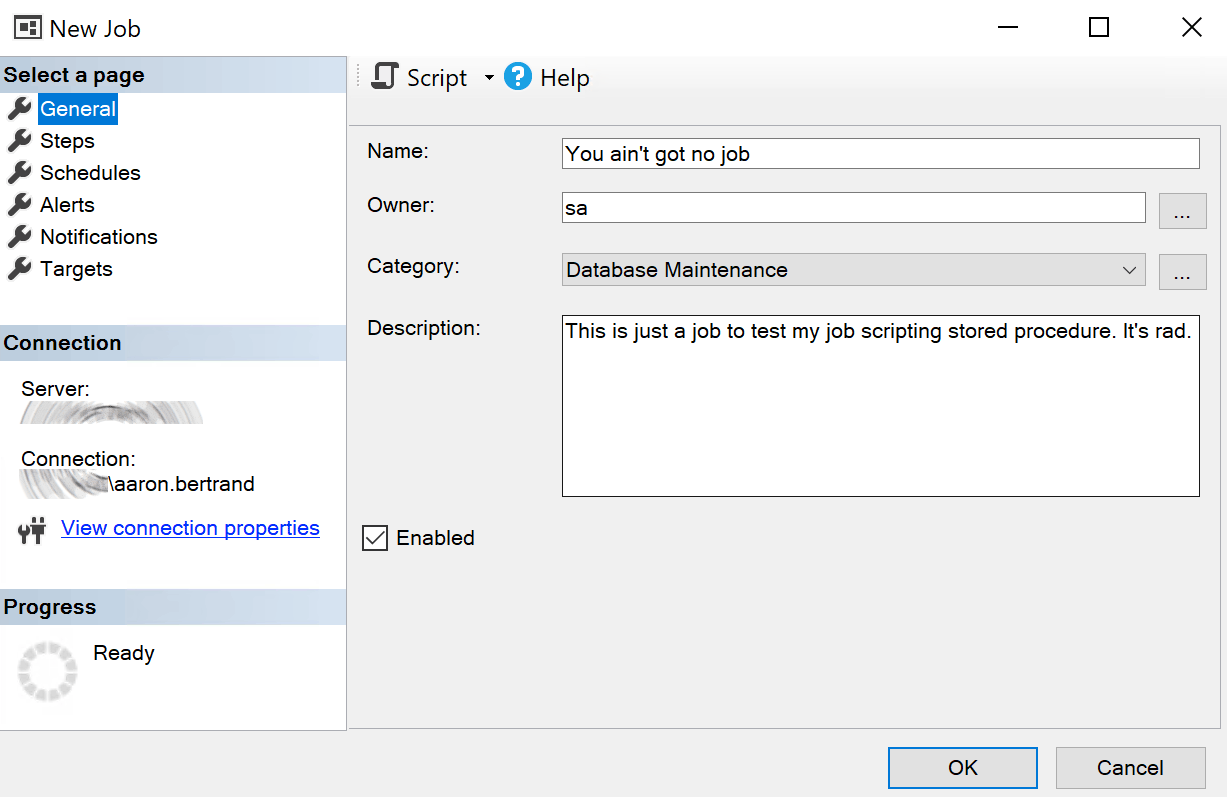
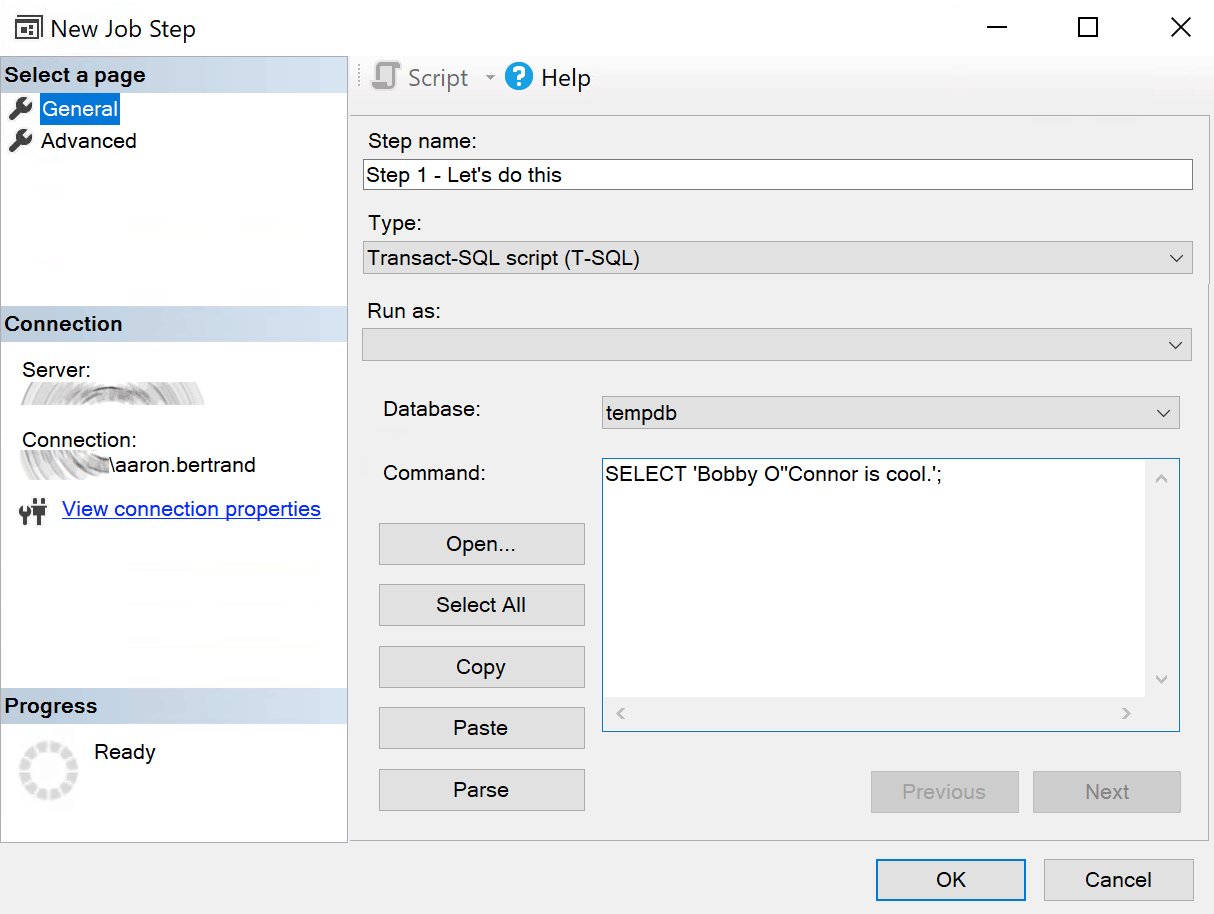
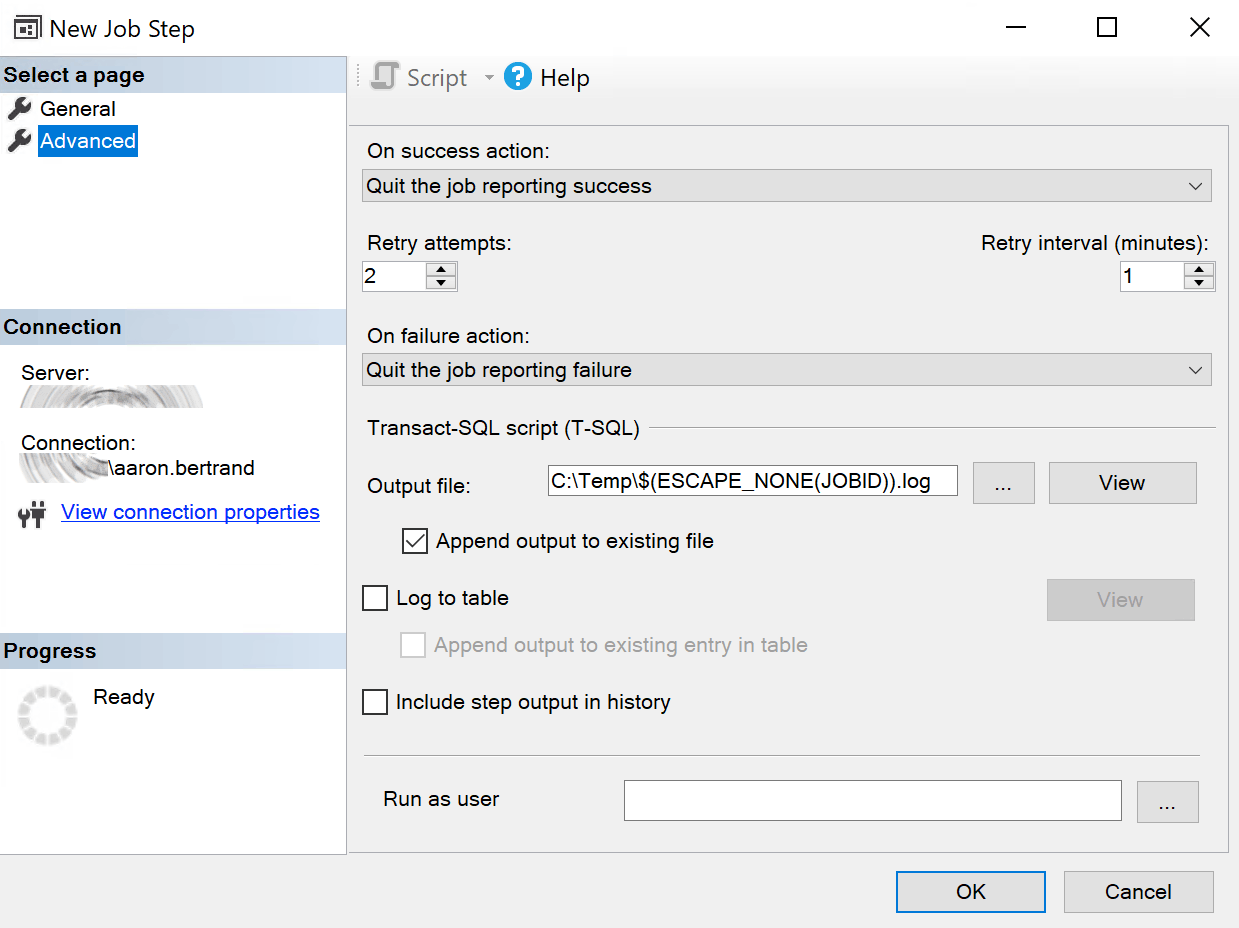
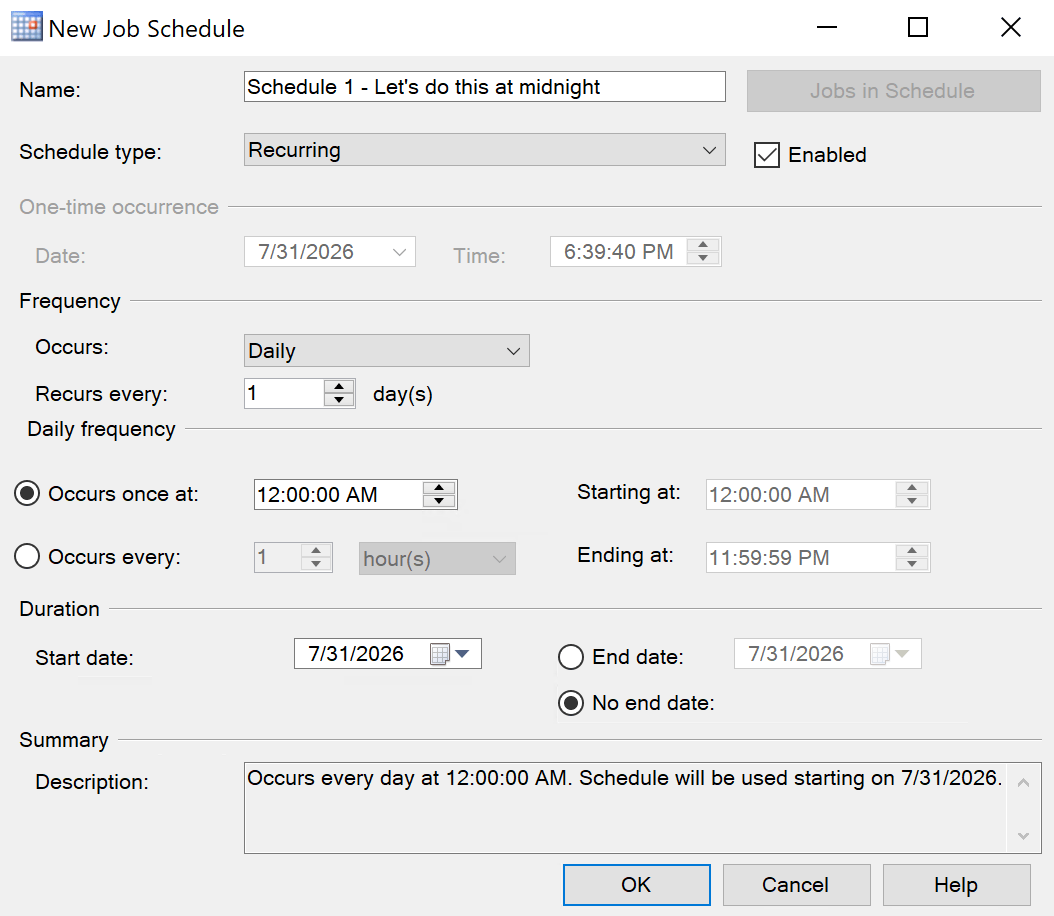
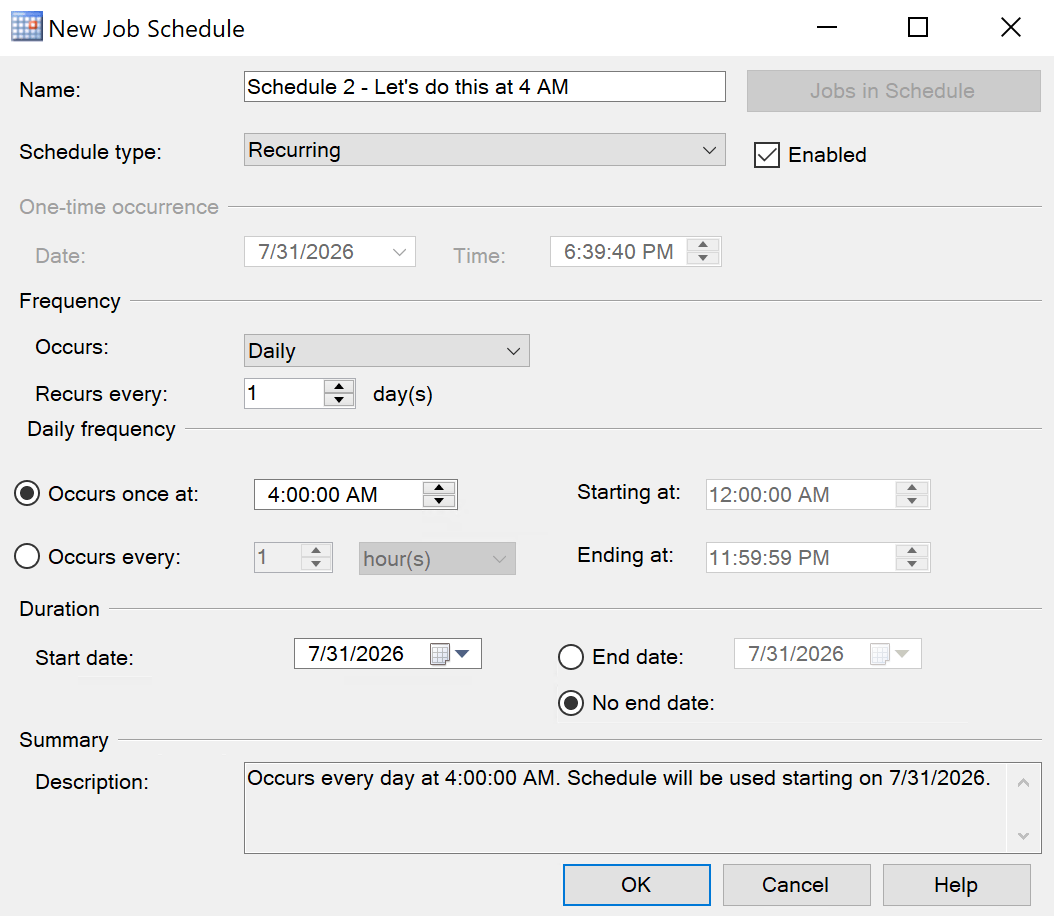
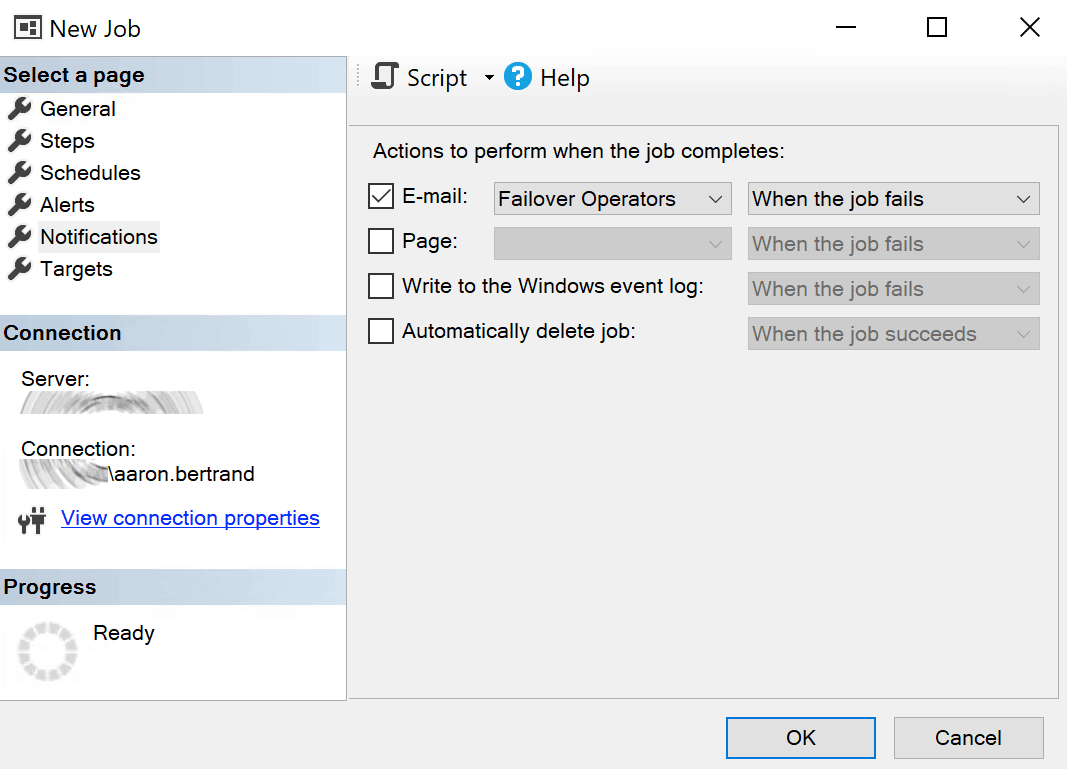
When scripting this job from Management Studio, here is the output (complete with gross M/D/Y output):
USE [msdb]
GO

/****** Object:  Job [You ain't got no job]    Script Date: 8/17/2026 6:42:53 PM ******/
BEGIN TRANSACTION
DECLARE @ReturnCode INT
SELECT @ReturnCode = 0
/****** Object:  JobCategory [Database Maintenance]    Script Date: 8/17/2026 6:42:53 PM ******/
IF NOT EXISTS (SELECT name FROM msdb.dbo.syscategories WHERE name=N'Database Maintenance' AND category_class=1)
BEGIN
EXEC @ReturnCode = msdb.dbo.sp_add_category @class=N'JOB', @type=N'LOCAL', @name=N'Database Maintenance'
IF (@@ERROR <> 0 OR @ReturnCode <> 0) GOTO QuitWithRollback

END

DECLARE @jobId BINARY(16)
EXEC @ReturnCode =  msdb.dbo.sp_add_job @job_name=N'You ain''t got no job',
		@enabled=1,
		@notify_level_eventlog=0,
		@notify_level_email=2,
		@notify_level_netsend=0,
		@notify_level_page=0,
		@delete_level=0,
		@description=N'This is just a job to test my job scripting stored procedure. It''s rad.',
		@category_name=N'Database Maintenance',
		@owner_login_name=N'sa',
		@notify_email_operator_name=N'Failover Operators', @job_id = @jobId OUTPUT
IF (@@ERROR <> 0 OR @ReturnCode <> 0) GOTO QuitWithRollback
/****** Object:  Step [Step 1 - Let's do this]    Script Date: 8/17/2026 6:42:53 PM ******/
EXEC @ReturnCode = msdb.dbo.sp_add_jobstep @job_id=@jobId, @step_name=N'Step 1 - Let''s do this',
		@step_id=1,
		@cmdexec_success_code=0,
		@on_success_action=1,
		@on_success_step_id=0,
		@on_fail_action=2,
		@on_fail_step_id=0,
		@retry_attempts=2,
		@retry_interval=1,
		@os_run_priority=0, @subsystem=N'TSQL',
		@command=N'SELECT ''Bobby O''''Connor is cool.'';',
		@database_name=N'tempdb',
		@output_file_name=N'C:\Temp\$(ESCAPE_NONE(JOBID)).log',
		@flags=2
IF (@@ERROR <> 0 OR @ReturnCode <> 0) GOTO QuitWithRollback
EXEC @ReturnCode = msdb.dbo.sp_update_job @job_id = @jobId, @start_step_id = 1
IF (@@ERROR <> 0 OR @ReturnCode <> 0) GOTO QuitWithRollback
EXEC @ReturnCode = msdb.dbo.sp_add_jobschedule @job_id=@jobId, @name=N'Schedule 1 - Let''s do this at midnight',
		@enabled=1,
		@freq_type=4,
		@freq_interval=1,
		@freq_subday_type=1,
		@freq_subday_interval=0,
		@freq_relative_interval=0,
		@freq_recurrence_factor=0,
		@active_start_date=20260731,
		@active_end_date=99991231,
		@active_start_time=0,
		@active_end_time=235959,
		@schedule_uid=N'558511df-e77d-41e2-a8c8-ee40676aa9d9'
IF (@@ERROR <> 0 OR @ReturnCode <> 0) GOTO QuitWithRollback
EXEC @ReturnCode = msdb.dbo.sp_add_jobschedule @job_id=@jobId, @name=N'Schedule 2 - Let''s do this at 4 AM',
		@enabled=1,
		@freq_type=4,
		@freq_interval=1,
		@freq_subday_type=1,
		@freq_subday_interval=0,
		@freq_relative_interval=0,
		@freq_recurrence_factor=0,
		@active_start_date=20260731,
		@active_end_date=99991231,
		@active_start_time=40000,
		@active_end_time=235959,
		@schedule_uid=N'0dd36ebd-4e8c-4985-925e-c47a9be61fb3'
IF (@@ERROR <> 0 OR @ReturnCode <> 0) GOTO QuitWithRollback
EXEC @ReturnCode = msdb.dbo.sp_add_jobserver @job_id = @jobId, @server_name = N'(local)'
IF (@@ERROR <> 0 OR @ReturnCode <> 0) GOTO QuitWithRollback
COMMIT TRANSACTION
GOTO EndSave
QuitWithRollback:
    IF (@@TRANCOUNT > 0) ROLLBACK TRANSACTION
EndSave:
GO
And here's the output from the procedure I wrote (listed below):
DECLARE @ReturnCode             int,
        @jobId                  binary(16),
        @error_message          nvarchar(2048),
        @owner_name             sysname,
        @email_operator_name    sysname = N'Failover Operators';

IF NOT EXISTS
(
    SELECT 1
      FROM msdb.dbo.sysjobs
     WHERE name = N'You ain''t got no job'
)
BEGIN
    IF @email_operator_name IS NOT NULL
       AND NOT EXISTS
           (
               SELECT 1
                 FROM msdb.dbo.sysoperators
                WHERE name = @email_operator_name
                  AND enabled = 1
           )
    BEGIN
        SET @error_message = N'email operator not found.';
        THROW 50101, @error_message, 1;
    END;

    -- Resolve the job owner at the destination.
    SELECT @owner_name = name
      FROM sys.server_principals
     WHERE [sid] = 0x01
       AND is_disabled = 0;

    IF @owner_name IS NULL
        THROW 50102, N'Destination job owner could not be resolved.', 1;

    IF @@TRANCOUNT > 0
        THROW 50103, N'This script cannot be executed inside an existing transaction.', 1;

    BEGIN TRY
        BEGIN TRANSACTION;

        SET @ReturnCode = 0;

        IF NOT EXISTS
        (
            SELECT 1
              FROM msdb.dbo.syscategories
             WHERE name = N'Database Maintenance'
               AND category_class = 1
        )
        BEGIN
            EXEC @ReturnCode = msdb.dbo.sp_add_category
                             @class = N'JOB',
                             @type  = N'LOCAL',
                             @name  = N'Database Maintenance';

            IF @ReturnCode <> 0
                THROW 50104, N'Failed to create job category.', 1;
        END;

        EXEC @ReturnCode = msdb.dbo.sp_add_job
             @job_name                     = N'You ain''t got no job',
             @enabled                      = 1,
             @notify_level_eventlog        = 0,
             @notify_level_email           = 2,
             @notify_email_operator_name   = @email_operator_name,
             @delete_level                 = 0,
             @description                  = N'This is just a job to test my job scripting stored procedure. It''s rad.',
             @category_name                = N'Database Maintenance',
             @owner_login_name             = @owner_name,
             @job_id                       = @jobId OUTPUT;

        IF @ReturnCode <> 0
            THROW 50105, N'Failed to create job.', 1;

        -- WARNING: This step writes output to a file.
        -- Verify that the path is valid on the destination
        -- and writable by the SQL Server Agent service account.
        EXEC @ReturnCode = msdb.dbo.sp_add_jobstep
             @job_id                = @jobId,
             @step_name             = N'Step 1 - Let''s do this',
             @step_id               = 1,
             @cmdexec_success_code  = 0,
             @on_success_action     = 1,
             @on_success_step_id    = 0,
             @on_fail_action        = 2,
             @on_fail_step_id       = 0,
             @retry_attempts        = 2,
             @retry_interval        = 1,
             @os_run_priority       = 0,
             @subsystem             = N'TSQL',
             @command               = N'SELECT ''Bobby O''''Connor is cool.'';',
             @additional_parameters = NULL,
             @server                = NULL,
             @database_name         = N'tempdb',
             @database_user_name    = NULL,
             @output_file_name      = N'C:\Temp\$(ESCAPE_NONE(JOBID)).log',
             @flags                 = 2;

        IF @ReturnCode <> 0
            THROW 50106, N'Failed to create step.', 1;

        EXEC @ReturnCode = msdb.dbo.sp_update_job
             @job_id       = @jobId,
             @start_step_id = 1;

        IF @ReturnCode <> 0
             THROW 50107, N'Failed to set start step.', 1;

        EXEC @ReturnCode = msdb.dbo.sp_add_jobschedule
             @job_id                  = @jobId,
             @name                    = N'Schedule 2 - Let''s do this at 4 AM',
             @enabled                 = 1,
             @freq_type               = 4,
             @freq_interval           = 1,
             @freq_subday_type        = 1,
             @freq_subday_interval    = 0,
             @freq_relative_interval  = 0,
             @freq_recurrence_factor  = 0,
             @active_start_date       = 20260731,
             @active_end_date         = 99991231,
             @active_start_time       = 40000,
             @active_end_time         = 235959;

        IF @ReturnCode <> 0
           THROW 50108, N'Failed to create a job schedule.', 1;

        EXEC @ReturnCode = msdb.dbo.sp_add_jobschedule
             @job_id                  = @jobId,
             @name                    = N'Schedule 1 - Let''s do this at midnight',
             @enabled                 = 1,
             @freq_type               = 4,
             @freq_interval           = 1,
             @freq_subday_type        = 1,
             @freq_subday_interval    = 0,
             @freq_relative_interval  = 0,
             @freq_recurrence_factor  = 0,
             @active_start_date       = 20260731,
             @active_end_date         = 99991231,
             @active_start_time       = 0,
             @active_end_time         = 235959;

        IF @ReturnCode <> 0
            THROW 50108, N'Failed to create a job schedule.', 1;

        EXEC @ReturnCode = msdb.dbo.sp_add_jobserver
            @job_id     = @jobId,
            @server_name = N'(local)';

        IF @ReturnCode <> 0
            THROW 50109, N'Failed to assign job to local server.', 1;

        COMMIT TRANSACTION;
    END TRY
    BEGIN CATCH
        IF XACT_STATE() <> 0
            ROLLBACK TRANSACTION;

        THROW;
    END CATCH;
END;
That is a longer script, for sure, than what SSMS provides. But IMHO it gives a lot more visibility and control over what you're executing, and is less of a "magic box" than a single-line PowerShell call. Some other benefits and deliberate behaviors:
- Schedule and step GUIDs are omitted; SQL Server generates new ones every time.
- For my scenario, I prefix the job name to the schedule name, to be sure there is no conflict (or confusion about which job the schedule belongs to).
- Owners, databases, and other dependencies must already exist on the destination. I don't deal with proxies or net send/pager operators, but those could be added.
- Multi-server jobs are rejected instead of being silently converted to local jobs.
The procedure is rather lengthy, so before I list it out, I'll tell you that I originally wrote one an even longer one that also scripted and validated proxies and the other operators (page and net send). I looked at the output and tried to remember if I had seen any of these in use since the 2000s, and I don't think I have. But if you are looking for that coverage, please let me know; I'm happy to share the longer version.
I'll also mention other future enhancements you might consider:
- An option to keep the same schedule_uid (hey, you might want that).
- An option to execute the output at
{some linked server}. - An option to check the destination for too many jobs using a similar schedule. Even if you don't use the same schedule, if you set all of your jobs to run at midnight, don't be surprised at the storm that happens when they all kick off in unison.
- You could even take that a bit further and match on more than just start time – look at history and see how many jobs run long enough to encroach into the new start time.
- Outputting better comments (I currently output — single-line comments instead of /* block comments */).
- More abstraction of variables so they can be set at the top of the output script, especially if repeated (e.g. category name).
The Procedure
CREATE OR ALTER PROCEDURE dbo.ScriptJob
@job_name sysname,
@script nvarchar(max) = NULL OUTPUT,
@prefix_schedule_names bit = 0
AS
BEGIN
SET NOCOUNT ON;
DECLARE @job_id uniqueidentifier,
/* I don't want '''' and '''''' and '''''''' everywhere if I can help it: */
@crlf nchar(2) = NCHAR(13) + NCHAR(10),
@q1 nchar(1) = NCHAR(39),
@q2 nchar(2) = NCHAR(39) + NCHAR(39),
@n nchar(1) = NCHAR(78),
@null nchar(4) = N'NULL',
@endcomma nchar(3) = NCHAR(44) + NCHAR(13) + NCHAR(10),
@error_message nvarchar(2048),
@enabled tinyint,
@description nvarchar(512),
@start_step_id int,
@category_name sysname,
@category_type tinyint,
@owner_login_name sysname,
@owner_sid varbinary(85),
@notify_level_eventlog int,
@notify_level_email int,
@delete_level int,
@notify_email_operator_id int,
@email_operator_name sysname,
@has_local_target bit = 0,
/*
@q_ means quoted and quote-escaped string literal
A name could be 128 single quotes, so 128*2 + N'' = 259
*/
@q_job_name nvarchar(259),
@q_description nvarchar(1027),
@q_category_name nvarchar(259),
@q_owner_login_name nvarchar(259),
@q_email_operator_name nvarchar(259),
@q_category_type_name nvarchar(15);
/* Get job properties: */
SELECT @job_id = j.job_id,
@enabled = j.enabled,
@description = j.description,
@start_step_id = j.start_step_id,
@category_name = c.name,
@category_type = c.category_type,
@owner_sid = j.owner_sid,
@owner_login_name = SUSER_SNAME(j.owner_sid),
@notify_level_eventlog = j.notify_level_eventlog,
@notify_level_email = j.notify_level_email,
@delete_level = j.delete_level,
@notify_email_operator_id = j.notify_email_operator_id,
@email_operator_name = email_operator.name
FROM msdb.dbo.sysjobs AS j
INNER JOIN msdb.dbo.syscategories AS c
ON c.category_id = j.category_id
LEFT OUTER JOIN msdb.dbo.sysoperators AS email_operator
ON email_operator.id = j.notify_email_operator_id
WHERE j.name = @job_name;
IF @job_id IS NULL
BEGIN
SET @error_message = N'Job not found.';
THROW 50001, @error_message, 1;
END;
/*
sp_add_job requires an owner login name. If this can't be resolved,
we can set it to sa, unless sa is disabled. This may not be desired
behavior in your environment.
*/
IF @owner_login_name IS NULL
BEGIN
IF @owner_sid <> 0x01
SET @owner_sid = 0x01;
SELECT @owner_login_name = name /* might not be sa! */
FROM sys.server_principals
WHERE [sid] = @owner_sid
AND is_disabled = 0;
IF @owner_login_name IS /* still */ NULL
BEGIN
SET @error_message = N'Owner SID not found.';
THROW 50002, @error_message, 1;
END;
END;
SET @prefix_schedule_names = COALESCE(@prefix_schedule_names, 0);
/*
Detect orphaned source operator references, separate from
destination validation in the generated script. You may
decide to just make a note that the operator isn't valid
at the source and continue scripting.
*/
IF (@notify_email_operator_id > 0 OR @notify_level_email > 0)
AND @email_operator_name IS NULL
BEGIN
SET @error_message = N'email operator not found.';
THROW 50003, @error_message, 1;
END;
/*
This procedure scripts local jobs only.
Multi-server jobs are more complicated.
*/
IF EXISTS
(
SELECT 1 FROM msdb.dbo.sysjobservers
WHERE job_id = @job_id
AND server_id <> 0
)
BEGIN
SET @error_message = N'This procedure only scripts local jobs.';
THROW 50004, @error_message, 1;
END;
IF EXISTS
(
SELECT 1 FROM msdb.dbo.sysjobservers
WHERE job_id = @job_id
AND server_id = 0
)
BEGIN
SET @has_local_target = 1;
END;
/*
Schedule can't exceed 128 characters, so fail if longer.
(Better than silently truncating and having collisions.)
*/
IF @prefix_schedule_names = 1
BEGIN
IF EXISTS
(
SELECT 1 FROM msdb.dbo.sysjobschedules AS js
INNER JOIN msdb.dbo.sysschedules AS s
ON s.schedule_id = js.schedule_id
WHERE js.job_id = @job_id
AND DATALENGTH(CONCAT(@job_name, N' - ', s.name)) > 256
)
BEGIN
SET @error_message = N'Prefixing the schedule name would silently truncate it.';
THROW 50005, @error_message, 1;
END;
END;
SET @q_category_type_name = CONCAT(@n, QUOTENAME(CASE @category_type
WHEN 2 THEN N'MULTI-SERVER'
WHEN 3 THEN N'NONE'
ELSE N'LOCAL' END, @q1));
/* Safely quote values, many of which are QUOTENAME-safe: */
SET @q_job_name = COALESCE(@n + QUOTENAME(@job_name, @q1), @null);
SET @q_category_name = COALESCE(@n + QUOTENAME(@category_name, @q1), @null);
SET @q_owner_login_name = COALESCE(@n + QUOTENAME(@owner_login_name, @q1), @null);
SET @q_email_operator_name = COALESCE(@n + QUOTENAME(@email_operator_name, @q1), @null);
/* But values that can exceed 128 characters need REPLACE(): */
SET @q_description = COALESCE(@n + @q1 + REPLACE(@description, @q1, @q2) + @q1, @null);
/*
Begin the generated deployment script.
Operator names are variables so that they can be changed for a
destination environment without finding and editing sp_add_job.
You may wish to abstract some other properties, too.
*/
SET @script =
CONCAT
(
CAST(N'' AS nvarchar(max)),
N'DECLARE @ReturnCode int,', @crlf,
N' @jobId binary(16),', @crlf,
N' @error_message nvarchar(2048),', @crlf,
N' @owner_name sysname,', @crlf,
N' @email_operator_name sysname = ', @q_email_operator_name, N';', @crlf, @crlf,
N'IF NOT EXISTS', @crlf,
N'(', @crlf,
N' SELECT 1', @crlf,
N' FROM msdb.dbo.sysjobs', @crlf,
N' WHERE name = ', @q_job_name, @crlf,
N')', @crlf,
N'BEGIN', @crlf,
N' IF @email_operator_name IS NOT NULL', @crlf,
N' AND NOT EXISTS', @crlf,
N' (', @crlf,
N' SELECT 1', @crlf,
N' FROM msdb.dbo.sysoperators', @crlf,
N' WHERE name = @email_operator_name', @crlf,
N' AND enabled = 1', @crlf,
N' )', @crlf,
N' BEGIN', @crlf,
N' SET @error_message = N''email operator not found.'';', @crlf,
N' THROW 50101, @error_message, 1;', @crlf,
N' END;'
);
/*
Resolve the owner at the destination. If the source owner is the
principal with SID 0x01, resolve it by SID because it may have been
renamed. Otherwise, try the source name and then fall back to the
enabled principal with SID 0x01.
*/
SET @script =
CONCAT
(
@script, @crlf, @crlf,
N' -- Resolve the job owner at the destination.', @crlf,
N' SELECT @owner_name = name', @crlf,
N' FROM sys.server_principals', @crlf,
CASE
WHEN @owner_sid = 0x01
THEN N' WHERE [sid] = 0x01'
ELSE CONCAT(N' WHERE name = ', @q_owner_login_name)
END,
@crlf,
N' AND is_disabled = 0;', @crlf,
CASE
WHEN @owner_sid <> 0x01
THEN CONCAT
(
@crlf,
N' IF @owner_name IS NULL', @crlf,
N' BEGIN', @crlf,
N' SELECT @owner_name = name', @crlf,
N' FROM sys.server_principals', @crlf,
N' WHERE [sid] = 0x01', @crlf,
N' AND is_disabled = 0;', @crlf,
N' END;', @crlf
)
ELSE N''
END,
@crlf,
N' IF @owner_name IS NULL', @crlf,
N' THROW 50102, N''Destination job owner could not be resolved.'', 1;'
);
/*
Generate the transaction, category, and job creation.
Abort if the generated script is executed inside an existing transaction.
*/
SET @script =
CONCAT
(
@script, @crlf, @crlf,
N' IF @@TRANCOUNT > 0', @crlf,
N' THROW 50103, N''This script cannot be executed inside an existing transaction.'', 1;', @crlf, @crlf,
N' BEGIN TRY', @crlf,
N' BEGIN TRANSACTION;', @crlf, @crlf,
N' SET @ReturnCode = 0;', @crlf, @crlf,
N' IF NOT EXISTS', @crlf,
N' (', @crlf,
N' SELECT 1', @crlf,
N' FROM msdb.dbo.syscategories', @crlf,
N' WHERE name = ', @q_category_name, @crlf,
N' AND category_class = 1', @crlf,
N' )', @crlf,
N' BEGIN', @crlf,
N' EXEC @ReturnCode = msdb.dbo.sp_add_category', @crlf,
N' @class = N''JOB'',', @crlf,
N' @type = ', @q_category_type_name, @endcomma,
N' @name = ', @q_category_name, N';', @crlf, @crlf,
N' IF @ReturnCode <> 0', @crlf,
N' THROW 50104, ', N'N''Failed to create job category.'', 1;', @crlf,
N' END;', @crlf, @crlf,
N' EXEC @ReturnCode = msdb.dbo.sp_add_job', @crlf,
N' @job_name = ', @q_job_name, @endcomma,
N' @enabled = ', @enabled, @endcomma,
N' @notify_level_eventlog = ', @notify_level_eventlog, @endcomma,
N' @notify_level_email = ', @notify_level_email, @endcomma,
N' @notify_email_operator_name = @email_operator_name,', @crlf,
N' @delete_level = ', @delete_level, @endcomma,
N' @description = ', @q_description, @endcomma,
N' @category_name = ', @q_category_name, @endcomma,
N' @owner_login_name = @owner_name,', @crlf,
N' @job_id = @jobId OUTPUT;', @crlf, @crlf,
N' IF @ReturnCode <> 0', @crlf,
N' THROW 50105, ', N'N''Failed to create job.'', 1;'
);
/*
Script the job steps.
*/
DECLARE @step_id int,
@step_name sysname,
@subsystem nvarchar(40),
@command nvarchar(max),
@flags int,
@additional_parameters nvarchar(max),
@cmdexec_success_code int,
@on_success_action tinyint,
@on_success_step_id int,
@on_fail_action tinyint,
@on_fail_step_id int,
@step_server sysname,
@database_name sysname,
@database_user_name sysname,
@retry_attempts int,
@retry_interval int,
@os_run_priority int,
@output_file_name nvarchar(200),
@q_step_name nvarchar(259),
@q_subsystem nvarchar(83),
@q_command nvarchar(max),
@q_parameters nvarchar(max),
@q_step_server nvarchar(259),
@q_database_name nvarchar(259),
@q_db_user_name nvarchar(259),
@q_output_file nvarchar(403);
DECLARE @jobsteps cursor;
SET @jobsteps = CURSOR LOCAL FAST_FORWARD FOR
SELECT js.step_id,
js.step_name,
js.subsystem,
js.command,
js.flags,
CONVERT(nvarchar(max), js.additional_parameters),
js.cmdexec_success_code,
js.on_success_action,
js.on_success_step_id,
js.on_fail_action,
js.on_fail_step_id,
js.server,
js.database_name,
js.database_user_name,
js.retry_attempts,
js.retry_interval,
js.os_run_priority,
js.output_file_name
FROM msdb.dbo.sysjobsteps AS js
WHERE js.job_id = @job_id
ORDER BY js.step_id;
OPEN @jobsteps;
FETCH NEXT FROM @jobsteps
INTO @step_id,
@step_name,
@subsystem,
@command,
@flags,
@additional_parameters,
@cmdexec_success_code,
@on_success_action,
@on_success_step_id,
@on_fail_action,
@on_fail_step_id,
@step_server,
@database_name,
@database_user_name,
@retry_attempts,
@retry_interval,
@os_run_priority,
@output_file_name;
WHILE @@FETCH_STATUS = 0
BEGIN
SET @q_step_name = CONCAT(@n, QUOTENAME(@step_name, @q1));
SET @q_subsystem = CONCAT(@n, QUOTENAME(@subsystem, @q1));
SET @q_step_server = COALESCE(@n + QUOTENAME(@step_server, @q1), @null);
SET @q_database_name = COALESCE(@n + QUOTENAME(@database_name, @q1), @null);
SET @q_db_user_name = COALESCE(@n + QUOTENAME(@database_user_name, @q1), @null);
SET @q_command = COALESCE(@n + @q1 + REPLACE(@command, @q1, @q2) + @q1, @null);
SET @q_parameters = COALESCE(@n + @q1 + REPLACE(@additional_parameters, @q1, @q2) + @q1, @null);
SET @q_output_file = COALESCE(@n + @q1 + REPLACE(@output_file_name, @q1, @q2) + @q1, @null);
SET @script =
CONCAT
(
@script, @crlf, @crlf,
CASE WHEN @output_file_name > N''
THEN CONCAT
(
N' -- WARNING: This step writes output to a file.', @crlf,
N' -- Verify that the path is valid on the destination', @crlf,
N' -- and writable by the SQL Server Agent service account.', @crlf
)
ELSE N''
END,
CASE WHEN DATALENGTH(@output_file_name) = 400
THEN CONCAT
(
N' -- WARNING: output_file_name uses the full nvarchar(200).', @crlf,
N' -- The value may have been truncated before ',
N'being stored; verify the complete path.', @crlf
)
ELSE N''
END,
CASE WHEN @database_name IS NOT NULL
AND @database_name NOT IN (N'master', N'msdb', N'tempdb', N'model')
THEN CONCAT
(
N' -- WARNING: database_name may not be present at the destination.', @crlf
)
ELSE N''
END,
CASE WHEN @database_user_name IS NOT NULL
THEN CONCAT
(
N' -- WARNING: database_user_name may not be present at the destination.', @crlf
)
ELSE N''
END,
N' EXEC @ReturnCode = msdb.dbo.sp_add_jobstep', @crlf,
N' @job_id = @jobId,', @crlf,
N' @step_name = ', @q_step_name, @endcomma,
N' @step_id = ', @step_id, @endcomma,
N' @cmdexec_success_code = ', @cmdexec_success_code, @endcomma,
N' @on_success_action = ', @on_success_action, @endcomma,
N' @on_success_step_id = ', @on_success_step_id, @endcomma,
N' @on_fail_action = ', @on_fail_action, @endcomma,
N' @on_fail_step_id = ', @on_fail_step_id, @endcomma,
N' @retry_attempts = ', @retry_attempts, @endcomma,
N' @retry_interval = ', @retry_interval, @endcomma,
N' @os_run_priority = ', @os_run_priority, @endcomma,
N' @subsystem = ', @q_subsystem, @endcomma,
N' @command = ', @q_command, @endcomma,
N' @additional_parameters = ', @q_parameters, @endcomma,
N' @server = ', @q_step_server, @endcomma,
N' @database_name = ', @q_database_name, @endcomma,
N' @database_user_name = ', @q_db_user_name, @endcomma,
N' @output_file_name = ', @q_output_file, @endcomma,
N' @flags = ', @flags, N';', @crlf, @crlf,
N' IF @ReturnCode <> 0', @crlf,
N' THROW 50106, N''Failed to create step.'', 1;'
);
FETCH NEXT FROM @jobsteps
INTO @step_id,
@step_name,
@subsystem,
@command,
@flags,
@additional_parameters,
@cmdexec_success_code,
@on_success_action,
@on_success_step_id,
@on_fail_action,
@on_fail_step_id,
@step_server,
@database_name,
@database_user_name,
@retry_attempts,
@retry_interval,
@os_run_priority,
@output_file_name;
END;
/*
Set the starting step after all steps have been created.
*/
SET @script =
CONCAT
(
@script, @crlf, @crlf,
N' EXEC @ReturnCode = msdb.dbo.sp_update_job', @crlf,
N' @job_id = @jobId,', @crlf,
N' @start_step_id = ', @start_step_id, N';', @crlf, @crlf,
N' IF @ReturnCode <> 0', @crlf,
N' THROW 50107, N''Failed to set start step.'', 1;'
);
/*
Script all schedules attached to the job. If requested, prefix each
generated schedule name with the job name for easier identification.
schedule_uid is intentionally omitted. SQL Server generates a new
schedule that is initially attached only to this job. If the source
schedule is shared, the generated script creates an independent copy.
*/
DECLARE @schedule_name sysname,
@scripted_schedule_name sysname,
@schedule_enabled int,
@freq_type int,
@freq_interval int,
@freq_subday_type int,
@freq_subday_interval int,
@freq_relative_interval int,
@freq_recurrence_factor int,
@active_start_date int,
@active_end_date int,
@active_start_time int,
@active_end_time int,
@jobs_using_schedule int,
@q_schedule_name nvarchar(259);
DECLARE @schedules cursor;
SET @schedules = CURSOR LOCAL FAST_FORWARD FOR
SELECT s.name,
s.enabled,
s.freq_type,
s.freq_interval,
s.freq_subday_type,
s.freq_subday_interval,
s.freq_relative_interval,
s.freq_recurrence_factor,
s.active_start_date,
s.active_end_date,
s.active_start_time,
s.active_end_time,
jobs_using_schedule =
(
SELECT COUNT(*)
FROM msdb.dbo.sysjobschedules AS sch
WHERE sch.schedule_id = s.schedule_id
)
FROM msdb.dbo.sysjobschedules AS js
INNER JOIN msdb.dbo.sysschedules AS s
ON s.schedule_id = js.schedule_id
WHERE js.job_id = @job_id
ORDER BY s.schedule_id;
OPEN @schedules;
FETCH NEXT FROM @schedules
INTO @schedule_name,
@schedule_enabled,
@freq_type,
@freq_interval,
@freq_subday_type,
@freq_subday_interval,
@freq_relative_interval,
@freq_recurrence_factor,
@active_start_date,
@active_end_date,
@active_start_time,
@active_end_time,
@jobs_using_schedule;
WHILE @@FETCH_STATUS = 0
BEGIN
SET @scripted_schedule_name =
CASE @prefix_schedule_names
WHEN 1 THEN CONCAT(@job_name, N' - ') ELSE N'' END
+ @schedule_name;
SET @q_schedule_name = CONCAT(@n, QUOTENAME(@scripted_schedule_name, @q1));
SET @script =
CONCAT
(
@script, @crlf, @crlf,
CASE WHEN @jobs_using_schedule > 1
THEN CONCAT
(N' -- The source schedule was shared by multiple jobs;', @crlf,
N' -- this creates an independent copy.', @crlf)
ELSE N''
END,
N' EXEC @ReturnCode = msdb.dbo.sp_add_jobschedule', @crlf,
N' @job_id = @jobId,', @crlf,
N' @name = ', @q_schedule_name, @endcomma,
N' @enabled = ', @schedule_enabled, @endcomma,
N' @freq_type = ', @freq_type, @endcomma,
N' @freq_interval = ', @freq_interval, @endcomma,
N' @freq_subday_type = ', @freq_subday_type, @endcomma,
N' @freq_subday_interval = ', @freq_subday_interval, @endcomma,
N' @freq_relative_interval = ', @freq_relative_interval, @endcomma,
N' @freq_recurrence_factor = ', @freq_recurrence_factor, @endcomma,
N' @active_start_date = ', @active_start_date, @endcomma,
N' @active_end_date = ', @active_end_date, @endcomma,
N' @active_start_time = ', @active_start_time, @endcomma,
N' @active_end_time = ', @active_end_time, N';', @crlf, @crlf,
N' IF @ReturnCode <> 0', @crlf,
N' THROW 50108, N''Failed to create a job schedule.'', 1;'
);
FETCH NEXT FROM @schedules
INTO @schedule_name,
@schedule_enabled,
@freq_type,
@freq_interval,
@freq_subday_type,
@freq_subday_interval,
@freq_relative_interval,
@freq_recurrence_factor,
@active_start_date,
@active_end_date,
@active_start_time,
@active_end_time,
@jobs_using_schedule;
END;
/*
Preserve the local server assignment.
*/
IF @has_local_target = 1
BEGIN
SET @script =
CONCAT
(
@script, @crlf, @crlf,
N' EXEC @ReturnCode = msdb.dbo.sp_add_jobserver', @crlf,
N' @job_id = @jobId,', @crlf,
N' @server_name = N''(local)'';', @crlf, @crlf,
N' IF @ReturnCode <> 0', @crlf,
N' THROW 50109, N''Failed to assign job to local server.'', 1;'
);
END;
/*
Clean up.
*/
SET @script =
CONCAT
(
@script, @crlf, @crlf,
N' COMMIT TRANSACTION;', @crlf,
N' END TRY', @crlf,
N' BEGIN CATCH', @crlf,
N' IF XACT_STATE() <> 0', @crlf,
N' ROLLBACK TRANSACTION;', @crlf, @crlf,
N' THROW;', @crlf,
N' END CATCH;', @crlf,
N'END;', @crlf
);
SELECT Job = @script,
/* In case SSMS truncates output, thank Erik Darling https://dba.stackexchange.com/a/205733 */
AsXML = (SELECT @crlf + @crlf + @script + @crlf AS [processing-instruction(_)] FOR XML PATH(''));
END;
The point that SSMS-generated job scripts are too noisy to reuse across isolated servers really resonates. Making job creation idempotent so it only runs when the job is missing saves a lot of manual cleanup in test environments.
Excellent post! I always enjoy useful scripts like this, Aaron. Cheers, -Kev